'%20fill='%23fff'%3e%3cpath%20d='M24%20364.337V24h141.909c25.481%200%2046.833%203.601%2064.056%2010.803%2017.222%207.191%2030.183%2017.279%2038.882%2030.24s13.049%2027.972%2013.049%2045.041c0%2012.961-2.72%2024.513-8.148%2034.645-5.429%2010.142-12.906%2018.534-22.431%2025.174-9.526%206.651-20.548%2011.299-33.069%2013.953v3.325c13.732.661%2026.451%204.383%2038.134%2011.134%2011.684%206.762%2021.077%2016.155%2028.168%2028.17%207.092%2012.025%2010.638%2026.231%2010.638%2042.628%200%2018.281-4.647%2034.601-13.952%2048.939-9.305%2014.35-22.762%2025.648-40.381%2033.908-17.607%208.248-38.992%2012.377-64.143%2012.377H24zm82.258-200.414h45.534c8.975%200%2016.947-1.497%2023.929-4.493s12.432-7.312%2016.374-12.961c3.931-5.65%205.902-12.466%205.902-20.439%200-11.409-4.041-20.384-12.135-26.926-8.082-6.53-18.995-9.801-32.738-9.801h-46.866v74.62zm0%20134.109h50.853c17.839%200%2030.987-3.381%2039.466-10.131%208.479-6.762%2012.708-16.178%2012.708-28.247%200-8.755-2.049-16.309-6.145-22.686-4.096-6.365-9.922-11.298-17.443-14.789-7.532-3.491-16.561-5.231-27.089-5.231h-52.339v81.095l-.011-.011zM388.865%2024v340.337h-81.256V24h81.256zm181.618%20230.159V109.082h81.091v255.255h-77.435v-47.529h-2.665c-5.649%2015.616-15.263%2028.004-28.829%2037.145-13.578%209.14-29.941%2013.71-49.102%2013.71-17.398%200-32.683-3.986-45.864-11.97-13.181-7.973-23.433-19.14-30.745-33.489s-11.023-31.165-11.133-50.437V109.082h81.256v146.739c.11%2013.854%203.766%2024.767%2010.968%2032.74s17.002%2011.96%2029.413%2011.96c8.082%200%2015.372-1.795%2021.847-5.407%206.486-3.601%2011.628-8.865%2015.45-15.781%203.821-6.927%205.737-15.318%205.737-25.174h.011zm224.376%20115.002c-26.704%200-49.718-5.286-69.044-15.869-19.337-10.583-34.181-25.703-44.532-45.371-10.362-19.668-15.537-43.069-15.537-70.215s5.208-49.445%2015.614-69.212c10.418-19.779%2025.096-35.174%2044.037-46.197s41.261-16.53%2066.962-16.53c18.17%200%2034.787%202.83%2049.851%208.48s28.08%2014.007%2039.048%2025.086%2019.501%2024.734%2025.591%2040.966%209.14%2034.81%209.14%2055.756v20.273H694.145v-47.199h146.226c-.11-8.633-2.159-16.342-6.145-23.104s-9.448-12.047-16.374-15.869-14.866-5.726-23.841-5.726-17.233%202.015-24.424%206.057c-7.202%204.052-12.906%209.537-17.112%2016.452-4.207%206.927-6.431%2014.757-6.652%2023.512v48.025c0%2010.417%202.049%2019.525%206.145%2027.332s9.911%2013.876%2017.454%2018.193c7.532%204.317%2016.506%206.486%2026.924%206.486%207.201%200%2013.731-1.002%2019.612-2.995%205.869-1.993%2010.912-4.923%2015.119-8.81%204.206-3.876%207.367-8.645%209.47-14.294l74.616%202.158c-3.105%2016.728-9.889%2031.264-20.361%2043.62s-24.182%2021.937-41.129%2028.743c-16.947%206.816-36.559%2010.219-58.825%2010.219l.011.033z'/%3e%3c/g%3e%3cdefs%3e%3cclipPath%20id='A'%3e%3cpath%20fill='%23fff'%20transform='translate(24%2024)'%20d='M0%200h892v345.161H0z'/%3e%3c/clipPath%3e%3c/defs%3e%3c/svg%3e)
Organization Owner
Manage organization settings, members, billing, and plans as the organization owner.
Only the organization owner can open Organization Settings and manage organization-wide settings, members, billing, and plans.
Change organization settings
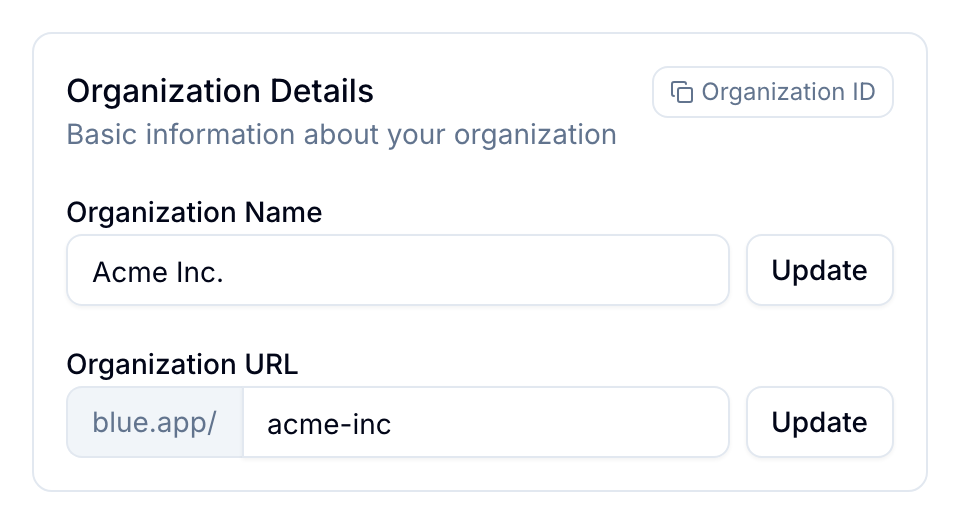
Open your organization’s settings page. You can change:
- Name: Change the organization name.
- URL: Change the URL slug that people use, for example,
blue.app/org/blue. - Image: Change the organization image shown in the sidebar and other parts of Blue.
- Color: Select Blue, Cyan, Indigo, Green, Amber, Red, Purple, Pink, Orange, or Black.
- Appearance: Use Bold Top Bar or Bold Sidebar to apply the theme color to that area.
- Workspace Terminology: Change the term “workspace” across the organization, for example, to “project” or “board.”
- AI Features: Enable or disable AI summarization and AI tagging.
- Delete Organization: Permanently delete the organization and all its data. Blue requires email verification.
Manage organization users
Remove a user
- Open the organization settings.
- Select Users.
- Remove the member.
- Confirm the removal. Blue revokes the member’s access to the organization.
The removed member’s comments and files remain visible in their workspaces.
View a member’s sign-in methods
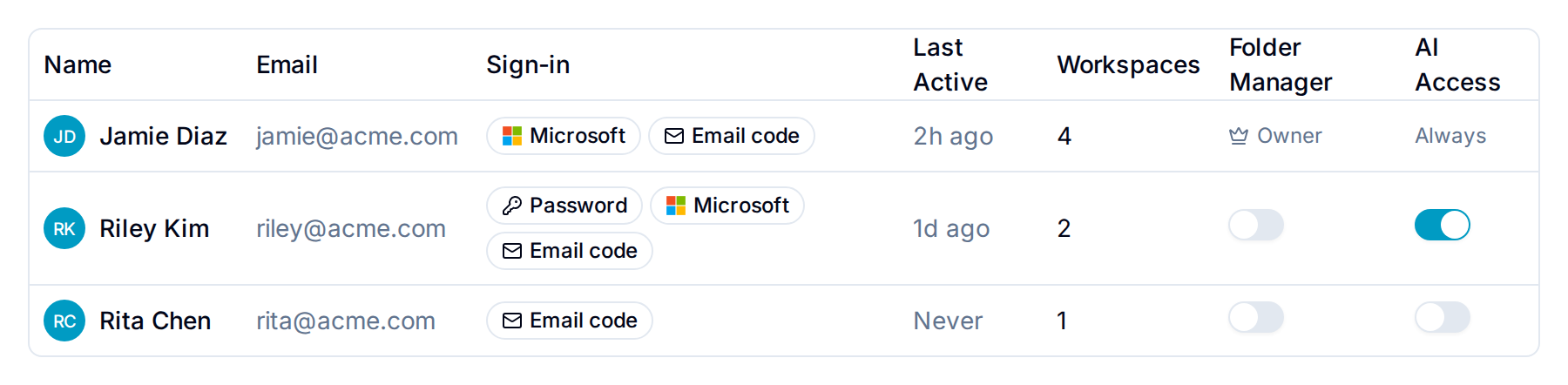
The Sign-in column lists every way a member can sign in: Password, Google, Microsoft, or Email code. A member can have more than one. Not signed in means the member accepted no invitation yet.
Email code always shows for a member who has signed in, because the email code works for every account.
Use this column to check that everyone uses your identity provider. A member who still shows Password or Email code can bypass the multi-factor authentication your provider enforces. Ask them to open Account → Access and remove the password. The email code is always available.
Only the organization owner sees this column. Changes a member makes to their sign-in methods appear within five minutes.
View a user’s workspace memberships
Open a member’s profile to view their workspace memberships. Each entry shows the access level or custom role and the date the member joined.
The list is read-only and excludes archived or template workspaces. The organization owner can view any member’s list.
Edit any workspace’s settings
The organization owner and Organization Administrators can open and save the Settings tab of any workspace in the organization. This includes workspaces they are not a member of, and workspaces where they hold a lower access level.
This covers everything on that tab, such as the inbound email address, the GitHub sync, the AI configuration, and the workspace color.
Manage billing and plans
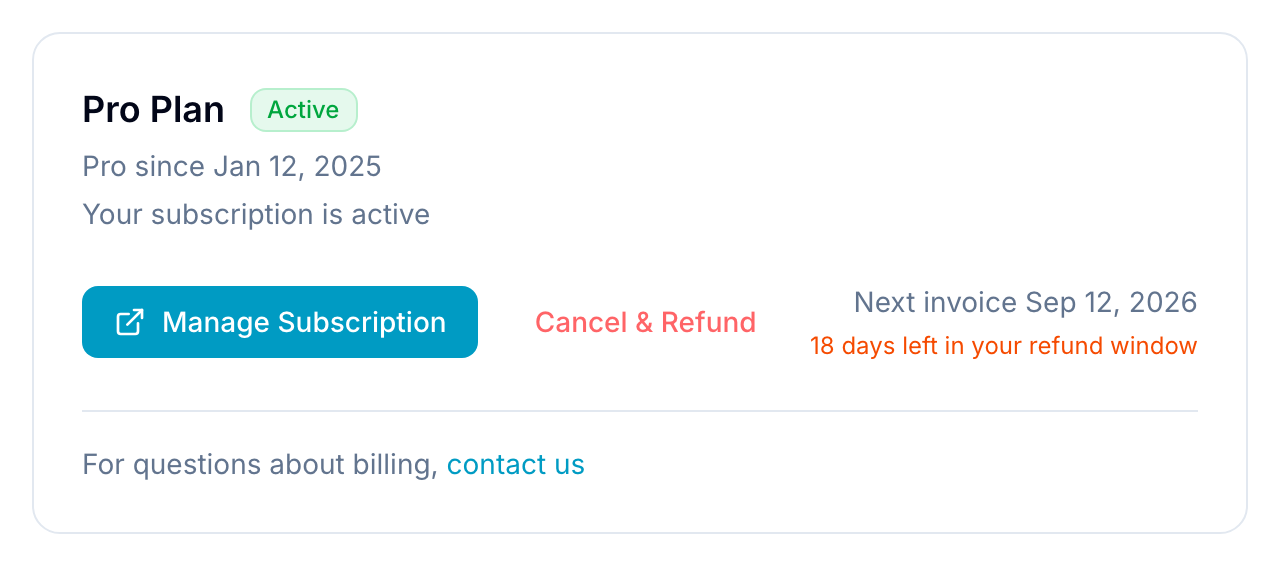
Only the organization owner can access Billing in Blue. Open the organization settings and select Billing to manage the tier, Pro add-on, and payment details.
From Billing, you can:
- View the current tier and usage against its limits.
- Upgrade to a higher tier with a one-time payment for the difference.
- Add the yearly Pro add-on to enable advanced features.
- Update payment details.
- View and download invoices.
- Cancel the Pro subscription. Tier purchases are one-time and cannot be canceled.
Get support
For help with organization owner access, email support@blue.app.