Aggregations
Add sums, averages, minimums, maximums, or counts for supported numeric report columns.
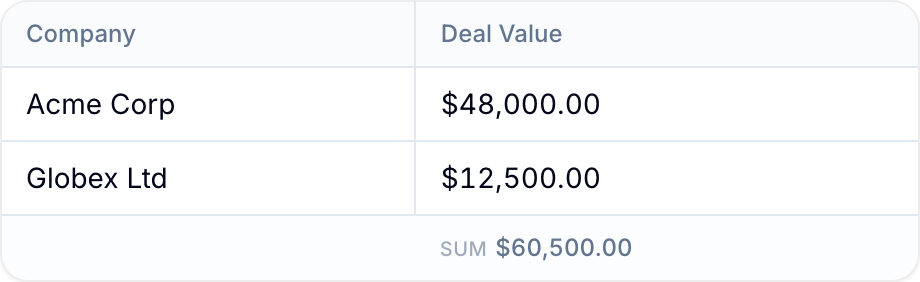
Aggregations calculate one summary for a numeric report column. Blue displays enabled summaries in the Summary area below the table.
Plan requirements
Reports require Pro or Enterprise.
Supported Field Types
You can add aggregations to these field types:
- Number
- Currency
- Percent
- Time duration
- Rating
- Formula, when the result is numeric
Non-numeric fields do not provide summary options.
Aggregation Types
Select one operation for each supported column:
- Sum: Adds all values.
- Average: Divides the sum by the number of values.
- Min: Shows the smallest value.
- Max: Shows the largest value.
- Count: Counts records that have a value in the column.
Add an Aggregation
- Create or edit a report.
- Add a supported numeric column.
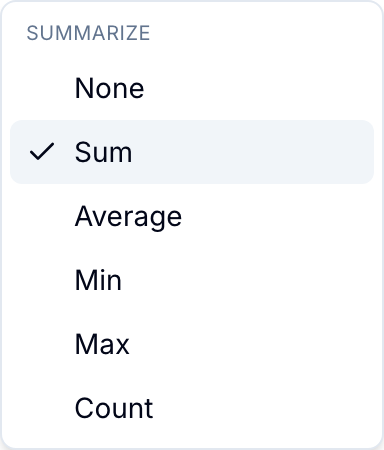
- In the selected column row, open the summary picker.
- Select Sum, Average, Min, Max, or Count.
- Select Create or Save.
Select None to remove an aggregation from a column.
Value Formatting
Blue formats the result for its field type:
- Currency uses the field’s currency symbol and decimal rules.
- Percent adds
%. - Time duration uses hours and minutes.
- Rating uses one decimal place.
- Other numbers use up to two decimal places.
Filtered Results
Aggregations include records that match the saved data-source filters. They also update when you apply temporary report filters.