'%20fill='%23fff'%3e%3cpath%20d='M24%20364.337V24h141.909c25.481%200%2046.833%203.601%2064.056%2010.803%2017.222%207.191%2030.183%2017.279%2038.882%2030.24s13.049%2027.972%2013.049%2045.041c0%2012.961-2.72%2024.513-8.148%2034.645-5.429%2010.142-12.906%2018.534-22.431%2025.174-9.526%206.651-20.548%2011.299-33.069%2013.953v3.325c13.732.661%2026.451%204.383%2038.134%2011.134%2011.684%206.762%2021.077%2016.155%2028.168%2028.17%207.092%2012.025%2010.638%2026.231%2010.638%2042.628%200%2018.281-4.647%2034.601-13.952%2048.939-9.305%2014.35-22.762%2025.648-40.381%2033.908-17.607%208.248-38.992%2012.377-64.143%2012.377H24zm82.258-200.414h45.534c8.975%200%2016.947-1.497%2023.929-4.493s12.432-7.312%2016.374-12.961c3.931-5.65%205.902-12.466%205.902-20.439%200-11.409-4.041-20.384-12.135-26.926-8.082-6.53-18.995-9.801-32.738-9.801h-46.866v74.62zm0%20134.109h50.853c17.839%200%2030.987-3.381%2039.466-10.131%208.479-6.762%2012.708-16.178%2012.708-28.247%200-8.755-2.049-16.309-6.145-22.686-4.096-6.365-9.922-11.298-17.443-14.789-7.532-3.491-16.561-5.231-27.089-5.231h-52.339v81.095l-.011-.011zM388.865%2024v340.337h-81.256V24h81.256zm181.618%20230.159V109.082h81.091v255.255h-77.435v-47.529h-2.665c-5.649%2015.616-15.263%2028.004-28.829%2037.145-13.578%209.14-29.941%2013.71-49.102%2013.71-17.398%200-32.683-3.986-45.864-11.97-13.181-7.973-23.433-19.14-30.745-33.489s-11.023-31.165-11.133-50.437V109.082h81.256v146.739c.11%2013.854%203.766%2024.767%2010.968%2032.74s17.002%2011.96%2029.413%2011.96c8.082%200%2015.372-1.795%2021.847-5.407%206.486-3.601%2011.628-8.865%2015.45-15.781%203.821-6.927%205.737-15.318%205.737-25.174h.011zm224.376%20115.002c-26.704%200-49.718-5.286-69.044-15.869-19.337-10.583-34.181-25.703-44.532-45.371-10.362-19.668-15.537-43.069-15.537-70.215s5.208-49.445%2015.614-69.212c10.418-19.779%2025.096-35.174%2044.037-46.197s41.261-16.53%2066.962-16.53c18.17%200%2034.787%202.83%2049.851%208.48s28.08%2014.007%2039.048%2025.086%2019.501%2024.734%2025.591%2040.966%209.14%2034.81%209.14%2055.756v20.273H694.145v-47.199h146.226c-.11-8.633-2.159-16.342-6.145-23.104s-9.448-12.047-16.374-15.869-14.866-5.726-23.841-5.726-17.233%202.015-24.424%206.057c-7.202%204.052-12.906%209.537-17.112%2016.452-4.207%206.927-6.431%2014.757-6.652%2023.512v48.025c0%2010.417%202.049%2019.525%206.145%2027.332s9.911%2013.876%2017.454%2018.193c7.532%204.317%2016.506%206.486%2026.924%206.486%207.201%200%2013.731-1.002%2019.612-2.995%205.869-1.993%2010.912-4.923%2015.119-8.81%204.206-3.876%207.367-8.645%209.47-14.294l74.616%202.158c-3.105%2016.728-9.889%2031.264-20.361%2043.62s-24.182%2021.937-41.129%2028.743c-16.947%206.816-36.559%2010.219-58.825%2010.219l.011.033z'/%3e%3c/g%3e%3cdefs%3e%3cclipPath%20id='A'%3e%3cpath%20fill='%23fff'%20transform='translate(24%2024)'%20d='M0%200h892v345.161H0z'/%3e%3c/clipPath%3e%3c/defs%3e%3c/svg%3e)
Database Sync
Mirror one external MySQL or PostgreSQL table into a workspace as read-only Blue records.
Database Sync copies rows from one table in your own MySQL or PostgreSQL database into a Blue workspace. Each row becomes a record. Blue reads the table on a schedule and updates the mirrored records.
The mirror is one-way. Blue never writes to your database. Mirrored fields are read-only in Blue and must be changed at the source.
Before you start
You must be a Project Administrator in the workspace that receives the records.
Your database must meet these conditions:
- The provider is MySQL or PostgreSQL.
- The database accepts connections from the internet. Blue refuses hosts that resolve to a private, internal, or link-local address.
- The database accepts TLS connections with a certificate that a public certificate authority signed. Blue always connects with TLS and verifies the certificate. You cannot disable TLS.
- The source table has one primary key column. Blue does not support composite primary keys.
- The source table has a timestamp column that records the last change to each row. The column cannot contain null values.
Create a database user with read-only permission on the source table. Blue only reads.
Connect a database
- Open the workspace that will receive the records.
- Open Settings > Database Sync.
- Enter a Connection name.
- Enter the connection details with one of these methods:
- Paste a URL into Connection URL. Blue fills the connection fields.
- Select Database type, then enter the Host, Port, Database, Username, and Password.
- Review the connection fields. You can change each field separately.
- Select Test connection. Blue confirms that it can reach the database with these credentials.
- Select Load tables.
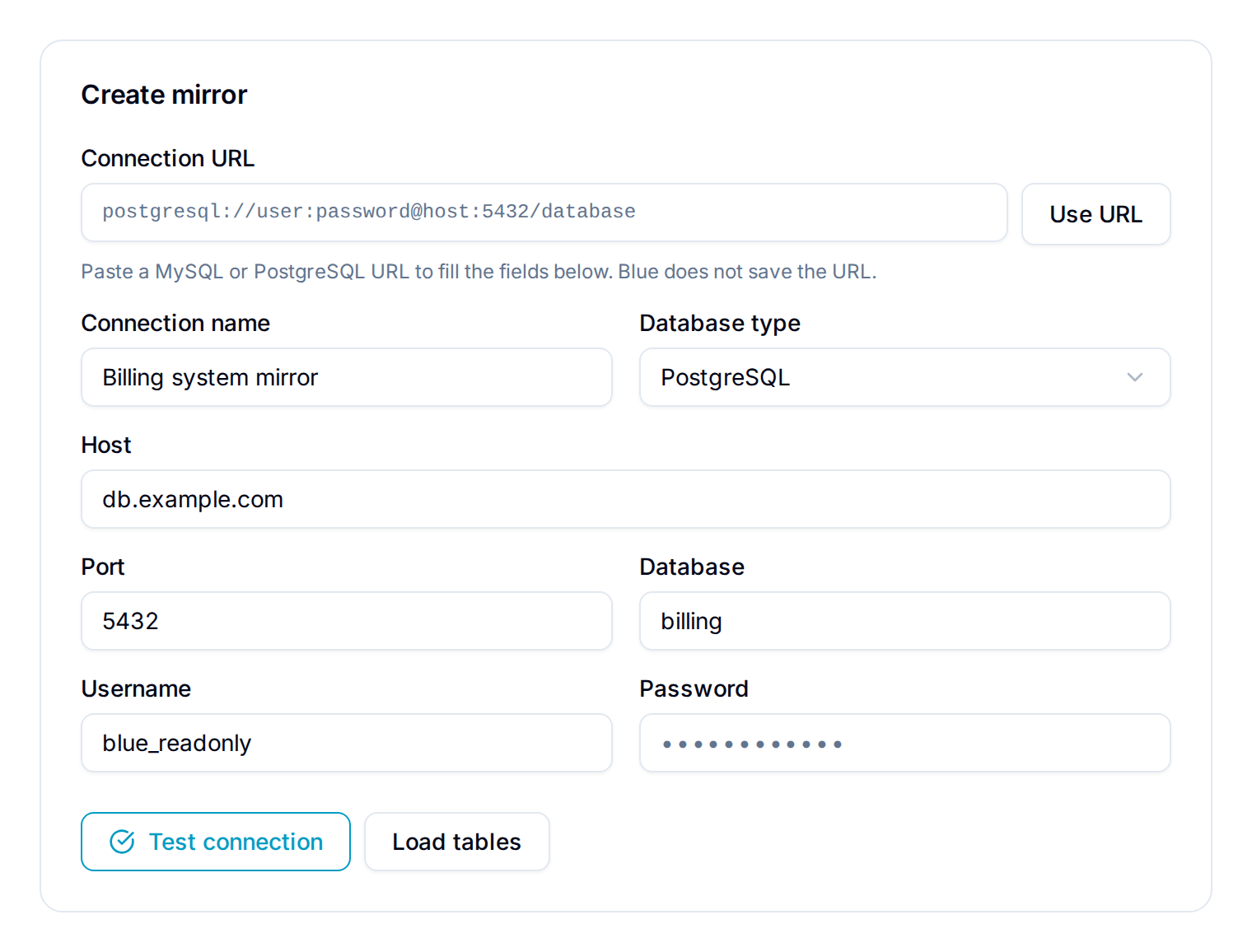
Blue stores the password encrypted. After the connection is saved, leave the password field blank to keep the saved password.
Blue accepts URLs that start with mysql://, postgres://, or postgresql://. Blue clears the URL after it fills the fields and does not save the complete URL. Add a private CA certificate separately in CA certificate.
Blue connects with TLS and verifies the server certificate on every connection, including the connection test. If the database refuses TLS, the test fails.
Select the table and map the columns
- Open Source table.
- Enter part of the schema or table name to filter the table list.
- Select a table. Blue reads the table structure and shows the first rows in Preview.
- Select the Primary key column. Blue uses this value to match a source row to its Blue record.
- Select the Updated at column. Blue uses this timestamp to find changed rows.
- Select the Title column. This column becomes the record title and is required.
- Enter Interval seconds to set how often Blue syncs. The default is 900 seconds. The permitted range is 60 seconds to 24 hours.
- Set Mirror to for each remaining column.
- Select Activate mirror. Blue queues the initial import and syncs the whole table.
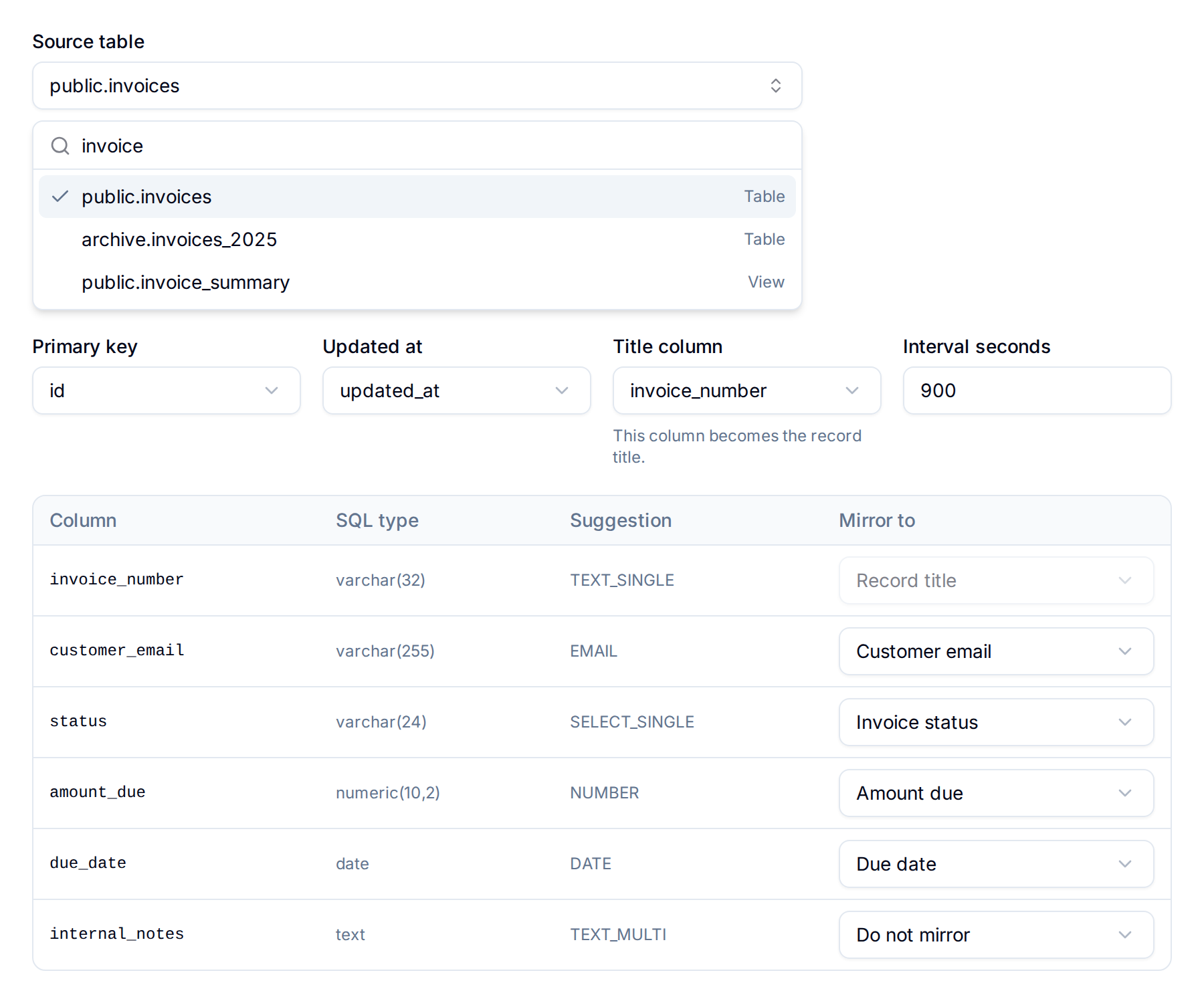
For each column, Mirror to accepts:
- Do not mirror: Blue ignores the column.
- A default field: Description, List, Start date, or Due date.
- An existing custom field in the workspace.
- + Create new field…: Blue creates a custom field for the column. Enter a Field name, select a Field type, then select Create field.
The Suggestion column shows the field type Blue derives from the column name and SQL type. Confirm or change the suggestion. Two columns cannot mirror to the same Blue field.
Blue locks the selected Title column to Record title in the mapping table. To use a different source column for record titles, change Title column above the table.
Supported field types
You can mirror a column to a custom field of these types:
Single line text, Multi line text, Email, URL, Phone, Number, Percent, Rating, Currency, Checkbox, Date, Single select, Multi select, and Country.
You cannot mirror a binary column, such as blob, binary, varbinary, or bytea.
A single select or multi select field accepts a maximum of 500 new options for each sync. If a column produces more options, the sync fails and names the column. Map a high-cardinality column to a text field instead.
Read the sync status
The Database Sync page shows the connection status, the last successful sync, the last attempted sync, the number of mapped fields, and the ten most recent runs.
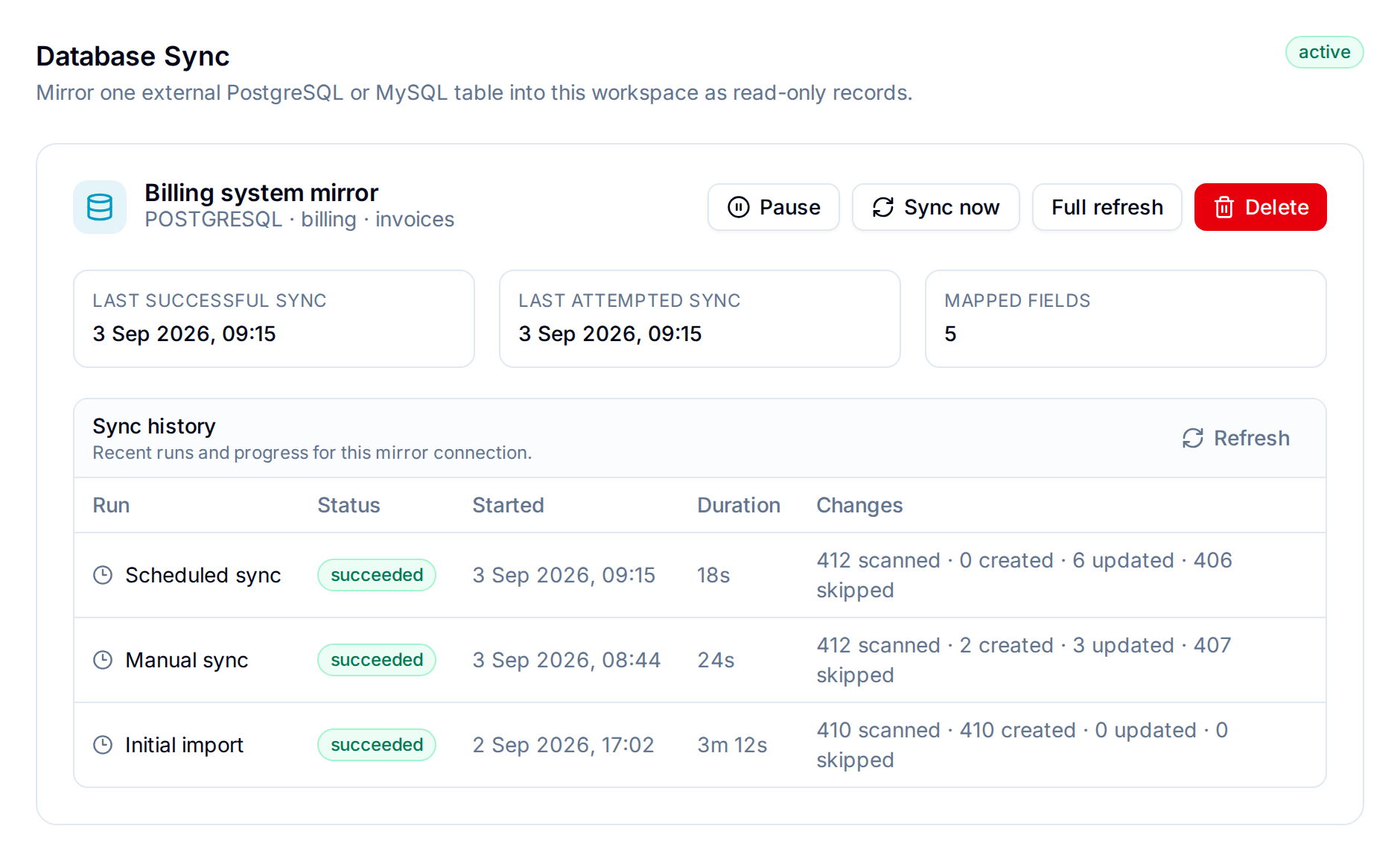
Each run reports its duration, the rows scanned, and the records created, updated, and skipped. A running sync shows its current elapsed time. Blue skips a row when the source values did not change.
Use these actions on an active connection:
- Sync now: Blue queues one sync of the rows changed since the last successful sync.
- Full refresh: Blue rereads the whole table. This run takes longer than a scheduled sync.
- Pause: Blue stops scheduled syncs. Mirrored records and fields stay read-only.
- Resume: Blue restarts scheduled syncs and queues a catch-up sync.
- Delete: Blue stops the sync and deletes the saved credentials.
The workspace name shows a Mirrored badge while a connection exists.
Work with mirrored records
Blue locks mirrored data so that the source database stays the only place to change it. A mirrored field shows Synced from database above its value.
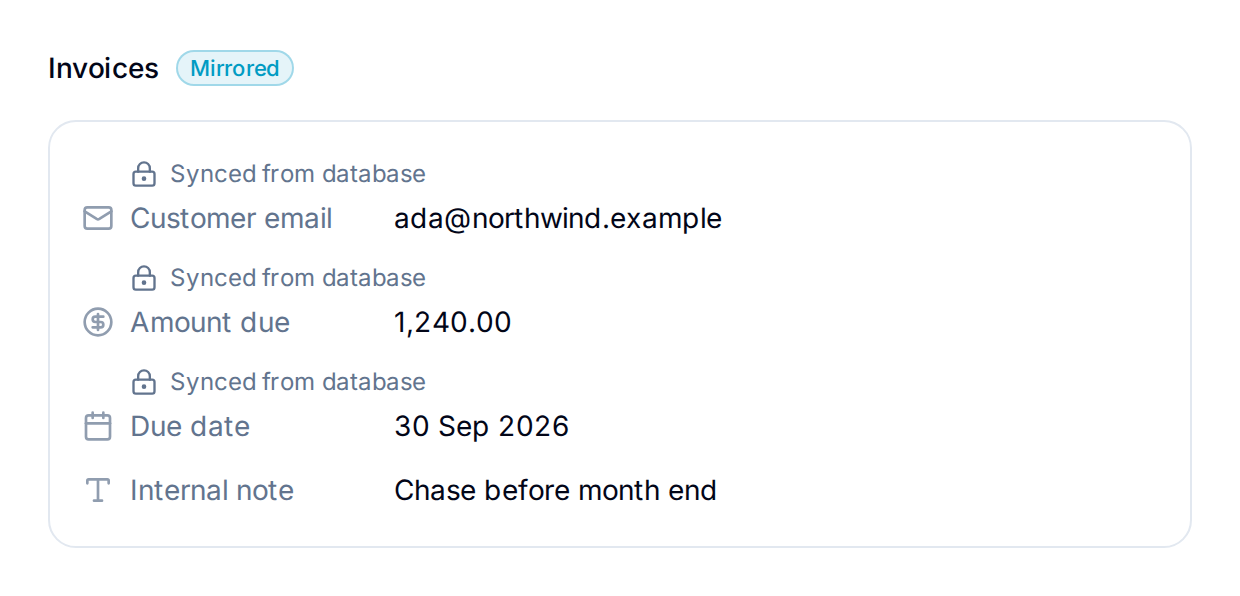
While a connection exists, you cannot:
- Change a mirrored field on a mirrored record.
- Change or delete a custom field that a mapping targets.
- Delete a mirrored record, or move it to the trash.
- Delete the list that holds mirrored records.
- Rename that list, if a column mirrors to List.
- Delete the workspace.
Fields that no mapping targets stay editable. You can also comment on a mirrored record, add checklists and files to it, and use it in views, reports, and automations.
The locks stay in place while the connection is paused or in error. Delete the connection to release them.
Deleted and missing rows
Blue never deletes a record because its source row disappeared.
A scheduled sync reads only changed rows, so it does not detect a deleted source row. Select Full refresh to find them. Blue marks a record whose source row no longer exists as missing at source. The record stays in the workspace, and its fields become editable again.
When the source schema changes
Blue compares your table structure against the saved mappings before each sync.
- If a mapped column is removed, or its type is no longer compatible with the Blue field, Blue pauses that one mapping and continues the sync. The mapping shows the status paused in the field table.
- If the primary key column or the timestamp column is removed, or the timestamp column is no longer a timestamp, Blue pauses the whole connection and marks the run as failed.
To restart a paused connection after you correct the source table, select Resume.
Troubleshooting
| Result | Cause and action |
|---|---|
| Test connection fails | Check the host, port, credentials, and that your database accepts connections from the internet. |
| Blue refuses the host | The host resolves to a private or internal address. Use a publicly reachable host. |
| Test connection reports a TLS or certificate error | The database does not accept TLS connections, or its certificate is self-signed, expired, or issued for a different host name. Correct the certificate on the database. |
| A warning asks for a stable primary key | The table has no single primary key column, or you selected a column that is not one. |
| A warning asks for a non-null timestamp column | The Updated at column accepts null values, or is not a timestamp type. Correct the column in your database. |
| The connection status is error | Read the message on the connection and in Sync history. Blue retries automatically, and returns the connection to active after a successful sync. |
| A field is paused in the field table | The source column changed. Correct the column, or delete and recreate the connection with a new mapping. |
| Records were not deleted after you deleted source rows | This is expected. Select Full refresh to mark them as missing at source. |
For further help, email support@blue.app.