'%20fill='%23fff'%3e%3cpath%20d='M24%20364.337V24h141.909c25.481%200%2046.833%203.601%2064.056%2010.803%2017.222%207.191%2030.183%2017.279%2038.882%2030.24s13.049%2027.972%2013.049%2045.041c0%2012.961-2.72%2024.513-8.148%2034.645-5.429%2010.142-12.906%2018.534-22.431%2025.174-9.526%206.651-20.548%2011.299-33.069%2013.953v3.325c13.732.661%2026.451%204.383%2038.134%2011.134%2011.684%206.762%2021.077%2016.155%2028.168%2028.17%207.092%2012.025%2010.638%2026.231%2010.638%2042.628%200%2018.281-4.647%2034.601-13.952%2048.939-9.305%2014.35-22.762%2025.648-40.381%2033.908-17.607%208.248-38.992%2012.377-64.143%2012.377H24zm82.258-200.414h45.534c8.975%200%2016.947-1.497%2023.929-4.493s12.432-7.312%2016.374-12.961c3.931-5.65%205.902-12.466%205.902-20.439%200-11.409-4.041-20.384-12.135-26.926-8.082-6.53-18.995-9.801-32.738-9.801h-46.866v74.62zm0%20134.109h50.853c17.839%200%2030.987-3.381%2039.466-10.131%208.479-6.762%2012.708-16.178%2012.708-28.247%200-8.755-2.049-16.309-6.145-22.686-4.096-6.365-9.922-11.298-17.443-14.789-7.532-3.491-16.561-5.231-27.089-5.231h-52.339v81.095l-.011-.011zM388.865%2024v340.337h-81.256V24h81.256zm181.618%20230.159V109.082h81.091v255.255h-77.435v-47.529h-2.665c-5.649%2015.616-15.263%2028.004-28.829%2037.145-13.578%209.14-29.941%2013.71-49.102%2013.71-17.398%200-32.683-3.986-45.864-11.97-13.181-7.973-23.433-19.14-30.745-33.489s-11.023-31.165-11.133-50.437V109.082h81.256v146.739c.11%2013.854%203.766%2024.767%2010.968%2032.74s17.002%2011.96%2029.413%2011.96c8.082%200%2015.372-1.795%2021.847-5.407%206.486-3.601%2011.628-8.865%2015.45-15.781%203.821-6.927%205.737-15.318%205.737-25.174h.011zm224.376%20115.002c-26.704%200-49.718-5.286-69.044-15.869-19.337-10.583-34.181-25.703-44.532-45.371-10.362-19.668-15.537-43.069-15.537-70.215s5.208-49.445%2015.614-69.212c10.418-19.779%2025.096-35.174%2044.037-46.197s41.261-16.53%2066.962-16.53c18.17%200%2034.787%202.83%2049.851%208.48s28.08%2014.007%2039.048%2025.086%2019.501%2024.734%2025.591%2040.966%209.14%2034.81%209.14%2055.756v20.273H694.145v-47.199h146.226c-.11-8.633-2.159-16.342-6.145-23.104s-9.448-12.047-16.374-15.869-14.866-5.726-23.841-5.726-17.233%202.015-24.424%206.057c-7.202%204.052-12.906%209.537-17.112%2016.452-4.207%206.927-6.431%2014.757-6.652%2023.512v48.025c0%2010.417%202.049%2019.525%206.145%2027.332s9.911%2013.876%2017.454%2018.193c7.532%204.317%2016.506%206.486%2026.924%206.486%207.201%200%2013.731-1.002%2019.612-2.995%205.869-1.993%2010.912-4.923%2015.119-8.81%204.206-3.876%207.367-8.645%209.47-14.294l74.616%202.158c-3.105%2016.728-9.889%2031.264-20.361%2043.62s-24.182%2021.937-41.129%2028.743c-16.947%206.816-36.559%2010.219-58.825%2010.219l.011.033z'/%3e%3c/g%3e%3cdefs%3e%3cclipPath%20id='A'%3e%3cpath%20fill='%23fff'%20transform='translate(24%2024)'%20d='M0%200h892v345.161H0z'/%3e%3c/clipPath%3e%3c/defs%3e%3c/svg%3e)
Trash
Restore deleted records, lists, fields, and workspaces before the organization's Trash retention window expires.
Trash stores deleted records, lists, custom fields, and workspaces until the organization’s retention window expires. An admin can restore an item before Blue purges it.
Restored items keep their values, comments, checklists, files, and automations. Use archiving instead when you plan to keep a record for later use.
Items stored in Trash
Blue stores these deleted items:
- Records: A deleted record keeps its data and can return to a list.
- Lists: A deleted list and all its records move to Trash together. Restoration returns that same set of records.
- Custom fields: A deleted field keeps all record values. Dependent automations pause, and related rollups show as broken until restoration.
- Workspaces: A deleted workspace keeps its lists, records, comments, custom fields, automations, and files in the organization’s Trash.
Deletion does not immediately run permanent cleanup. Blue purges the item after Delete forever or when the retention window ends.
Undo a record deletion
Deleting a record no longer asks you to confirm first. Blue deletes the record and shows a Record deleted message with an Undo action.
Select Undo to put the record back. This works for 5 minutes after the deletion, and only for the person who deleted the record. It gives no other access to Trash: you cannot undo someone else’s deletion this way, and Blue checks that you still have permission to delete the record before it restores it.
After the 5 minutes, or for anyone else, the record is recovered from Trash by an admin in the normal way.
You cannot undo a record that was deleted together with its list. Restore the list instead.
Open Trash
Use the location that matches the deleted item:
- Workspace Trash: Open Workspace Settings > Trash. Use Records, Lists, Fields, or All to view deleted workspace items. Workspace Owners and Admins have access.
- Organization Trash: Open Organization Settings > Trash to view deleted workspaces. Organization admins have access.
Each entry shows the item, who deleted it, the deletion date, and its scheduled purge date.
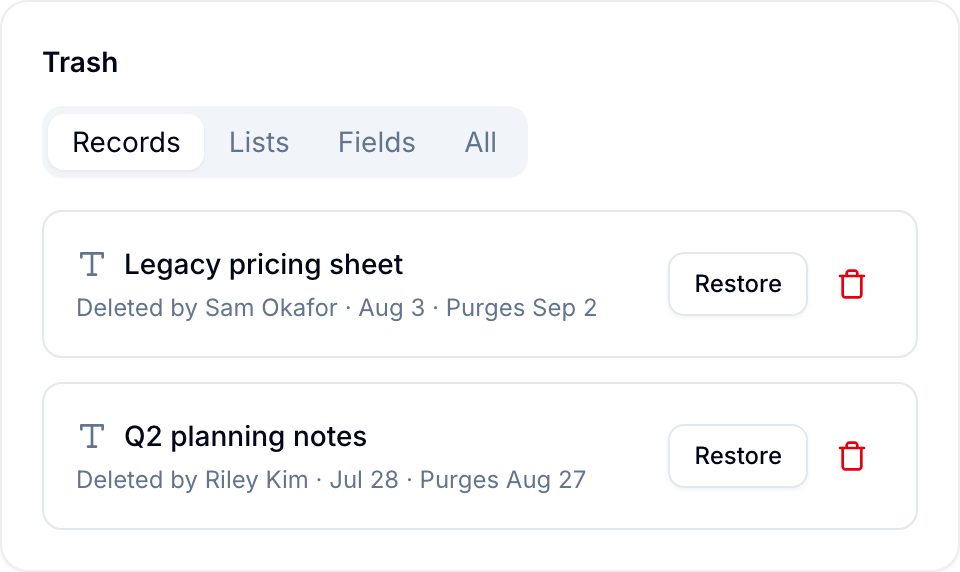
Restore an item
- Open the relevant Trash location.
- Find the deleted item.
- Select Restore.
Blue restores each item as follows:
- A record returns to its original list. If that list remains deleted, the record returns to the workspace’s first available list.
- A list returns with all records deleted with it. Records that were archived before deletion remain archived.
- A field returns with its values. Blue recomputes related rollups and resumes dependent automations.
- A workspace returns with all its contents. Blue restores its original name and address where possible.
You cannot restore one record separately if it was deleted with its list. Restore the list to recover that record.
Delete an item permanently
Select Delete forever in Trash to purge an item before its retention deadline. Blue runs permanent cleanup immediately, and you cannot undo the action.
To purge a workspace, type the requested confirmation. Purging the workspace also purges everything inside it.
Retention
The organization retention window controls when Blue automatically purges items. Open Organization Settings > Trash to change it.
The setting applies to every workspace in the organization. Changing it also changes the purge dates of items already in Trash.
| Window | Plan |
|---|---|
| 7 days | All plans |
| 30 days (default) | All plans |
| 60 days | Pro / Enterprise |
| 90 days | Pro / Enterprise |
| 180 days | Pro / Enterprise |
| 365 days | Pro / Enterprise |
| Keep forever | Pro / Enterprise |
New organizations use 30 days by default. If Pro becomes inactive, Blue keeps the selected setting but caps the active retention window at 90 days.
Blue applies the stored setting again when Pro is restored.
Permissions
Trash is available only to admins. Workspace Owners and Admins can view, restore, and purge records, lists, and fields in their workspace.
Organization admins can restore and purge workspaces in the organization’s Trash. Other roles can delete permitted items, but only an admin can restore them from Trash. The one exception is Undo, which lets the person who deleted a record reverse it within 5 minutes.
Related
- Archiving records sets a record aside without deleting it.